Guide to Troubleshooting and Routine Maintenance of Mechanical Stretching and Tensioning for Vibrating Screens
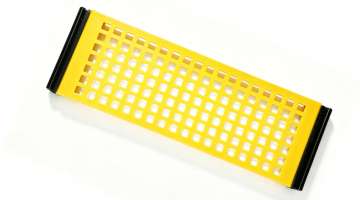
High-efficiency vibrating screens are the heart of production lines in the aggregate, mining, and recycling industries, and the tensioning system is crucial to ensuring their optimal performance. System failure can lead to loose screen media and material clogging, as well as violent machine oscillation, severely impacting production efficiency and equipment lifespan. This article details troubleshooting techniques for mechanical tensioning devices and outlines sound daily maintenance strategies to help you minimize downtime.
Identifying Warning Signs in Tensioning Systems
Operators should first learn to "listen" and "observe" during daily operations. Abnormal banging or knocking sounds of the vibrating screen, or material exhibiting unusual forward-jumping patterns on the screen surface, are often direct indicators of insufficient screen tension. Additionally, persistent wear or broken wires along the screen edges suggest that the tensioning system is failing to securely hold the screen media in place.
Troubleshooting Common Issues: From Springs to Clamps
When tensioning issues arise, a systematic troubleshooting approach is recommended. Begin by inspecting the tensioning springs—components highly susceptible to fatigue; if broken springs or plastic deformation are detected, they must be replaced in pairs. Next, examine the clamping bars or hook edges to ensure that prolonged vibration has not caused cracking or loosening. For systems utilizing tensioning rods, pay close attention to the threads; even minor thread damage can prevent the system from achieving the required preload.
Develop a Scientific Daily Maintenance Plan
Routine maintenance and preventive care are far more important than replacing components after a breakdown. It is recommended to re-check tension levels weekly,especially within the first 48 hours after installing a new screen, as initial stretching often causes the mesh to loosen. Simultaneously, keep the tensioning mechanism clean to prevent mud or debris from entering the machine and causing jams. Regularly applying lubricant to bolts and tensioning rods not only prevents rust but also ensures easier disassembly when maintenance is required.
Standardized Tension Adjustment Workflow for Optimal Screen Performance
The second key operational skill is following the correct multi-step tensioning procedure every single time you install a new screen panel, rather than just cranking down the bolts as tight as you can by hand. First, you lay the new screen panel flat across the support deck, making sure it is perfectly aligned with no sideways offset, then loosely thread all tensioning bolts into their corresponding hooks without tightening any of them fully. Next, you use a calibrated torque wrench to tighten the bolts in a strict diagonal sequence, applying 30% of the final specified torque on the first pass, 60% on the second pass, and 100% on the final pass, which ensures the tension spreads evenly across the entire screen surface without creating localized over-tensioned spots that would cause premature fatigue fracture. After you finish tightening all bolts, you start the Vibrating Screens unit and let it run unloaded for 30 minutes, then shut it down and re-check all tensioning bolts to top up any lost preload caused by the initial slight creep deformation of the new screen material. This staged adjustment method ensures the final tension value stays within the manufacturer’s recommended 0.5 to 1.5kN/m range, balancing the need for enough tension to keep the screen taut and flat, while avoiding over-tensioning that would drastically shorten the screen’s total service life.
Tiered Routine Maintenance Routine to Eliminate Recurring Tension Failures
The third critical long-term optimization is building a tiered daily, weekly and monthly maintenance schedule tailored specifically for the mechanical tensioning system, which catches 90% of potential hidden issues before they cause unexpected downtime. The daily 5-minute check only requires your crew to glance at the anti-loosening marker lines you drew across every tensioning bolt head and the screen frame, as even a 1mm shift of the marker line is a clear sign that the bolt has started to loosen and needs immediate re-torquing. The weekly check involves using a torque wrench to verify that every single tensioning bolt is still holding the correct specified torque, and inspecting all tensioning hooks for signs of surface wear or micro-cracks that would weaken their load-bearing capacity. The monthly deep maintenance step involves removing every tensioning bolt, cleaning the threads thoroughly to remove accumulated dust and old dried grease, then applying a thin layer of anti-seize lubricant before re-installing them, which prevents the bolts from seizing up in their threaded holes and makes future tension adjustments far smoother and faster. This consistent, layered maintenance routine cuts the total number of unexpected tension-related failures by more than 70%, and extends the average service life of your screen panels by 40% to 50%, making every Vibrating Screens unit in your plant far more reliable and low-maintenance over its entire operational lifecycle.
Routine maintenance of the stretching and tensioning system is essential for ensuring the efficient operation of the vibrating screen. Establishing a standardized inspection protocol and promptly addressing minor issues not only extends the service life of the vibrating screen equipment but also boosts production efficiency and ensures a consistent output of high-quality material.